Note: 1Password SaaS Manager was previously named Trelica. Some commands and integrations still use or refer to Trelica. Follow directions as written to avoid errors.
Read the official documentation about using Metabase with DuckDB.
Choosing your initialization script
The export generates different initialization scripts that you can pick based on your use case:
-
Local files: Use
init_duckdb_local.sql(creates views - queries Parquet files directly) -
S3 files (recommended for Metabase): Use
init_duckdb_s3.sql(creates tables - downloads data once for fast queries) -
S3 files (always fresh data): Use
init_duckdb_s3_views.sql(creates views - queries S3 on each SELECT)
init_duckdb_s3.sql (tables). Tables cache the data in DuckDB, making dashboard queries much faster. Views query S3 on each SELECT, which is slower but always shows the latest data. For BI tools, you typically want fast, cached data and can refresh periodically. It also means you can materialize the data from AWS without having to configure credentials in the Metabase container.To refresh table data when new exports are available:
# Re-run the init script to reload data from S3
duckdb trelica_dw.db < init_duckdb_s3.sql
Metabase with DuckDB: local file path setup
When you create a DuckDB database using relative paths in your SQL initialization script, you need those same relative paths to work inside the Metabase container.
For example, if you create your database like this:
duckdb trelica_local.db < init_duckdb_local.sqlAnd your init_duckdb_local.sql contains relative paths:
CREATE OR REPLACE VIEW app AS SELECT * FROM 'app.parquet';
CREATE OR REPLACE VIEW person AS SELECT * FROM 'person.parquet';
CREATE OR REPLACE VIEW team AS SELECT * FROM 'team.parquet';
These relative paths are stored in the DuckDB database metadata. When Metabase queries the database, DuckDB will look for these parquet files relative to the current working directory.
The solution: set the working directory with -w
Use the -w (working directory) parameter when running the container to match where your files are located:
docker run -d \
    -p 3000:3000 \
    -v ~/projects/analytics/data:/home/metabase/data \
    -v ~/projects/analytics/metabase-db:/metabase-data \
    -e MB_DB_FILE=/metabase-data/metabase.db \
    -w /home/metabase/data \
    --name metabase-duckdb \
metabase-duckdb-w /home/metabase/data sets the working directory inside the container to match where your data files are mounted.Why this works
-
Your local setup: All your files are in one directory (e.g.,
~/projects/analytics/data/)-
trelica_local.db(the DuckDB database) -
app.parquet,person.parquet,team.parquet(data files) -
init_duckdb_local.sql(initialization script)
-
-
You create the database locally:
cd ~/projects/analytics/data
duckdb trelica_local.db < init_duckdb_local.sql
DuckDB stores references like
app.parquet(relative paths) -
In the container:
- Volume mount:
~/projects/analytics/data→/home/metabase/data - Working directory:
-w /home/metabase/data - When Metabase queries the database, DuckDB looks for
app.parquetrelative to/home/metabase/data - File found at
/home/metabase/data/app.parquet✓
- Volume mount:
What happens without -w
If you don't set the working directory (or set it incorrectly):
# Without -w, working directory defaults to /home/metabase
docker run -d -p 3000:3000 -v ~/projects/analytics/data:/home/metabase/data ...- Metabase queries the database at
/home/metabase/data/trelica_local.db - DuckDB tries to find
app.parquetrelative to/home/metabase(the working directory) - Looks for
/home/metabase/app.parquet✗ - Error: File not found
-w parameter, your database will connect but queries will fail with "file not found" errors because DuckDB can't locate the parquet files.Connecting to the database in Metabase
When adding the DuckDB database connection:
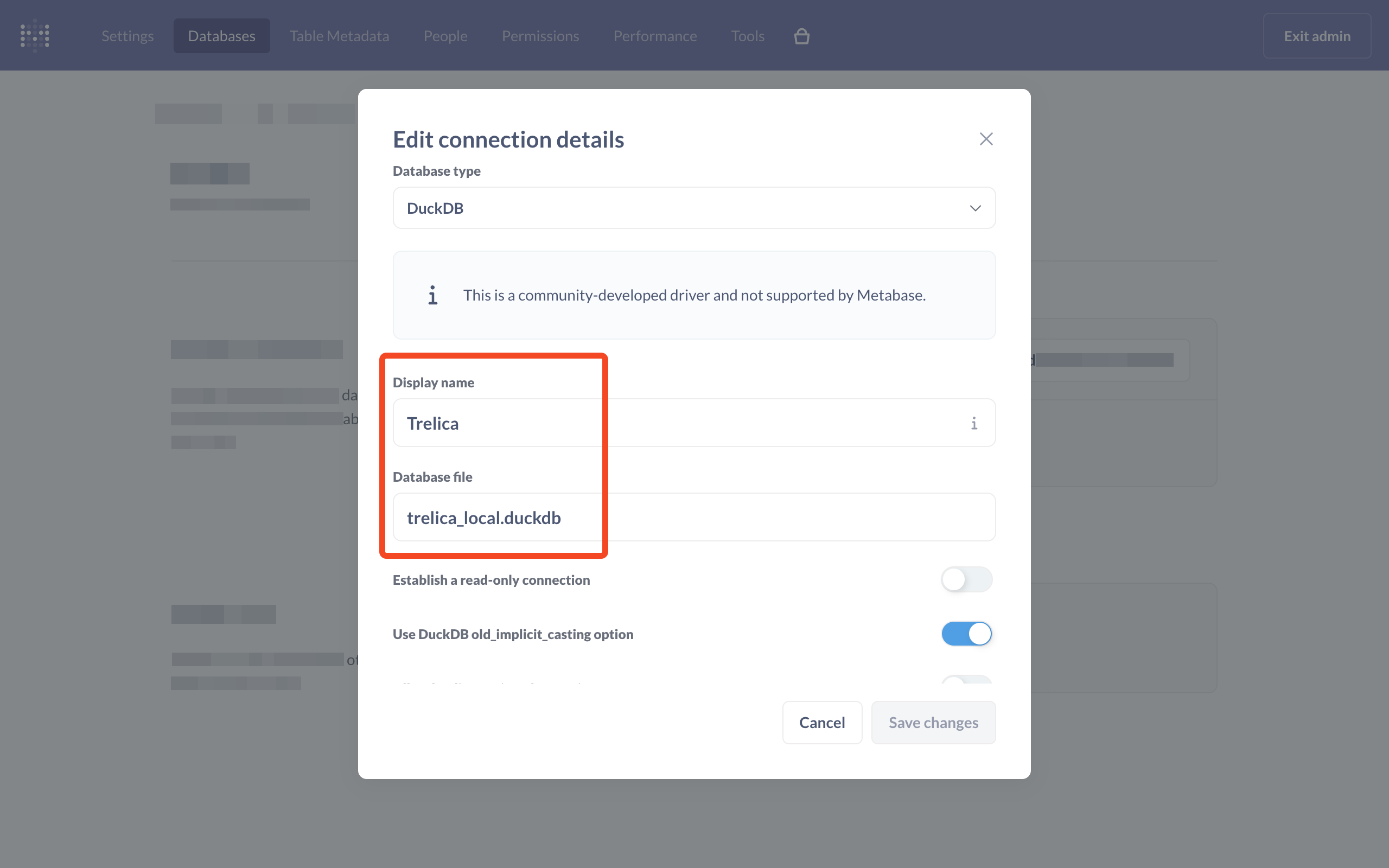
Database file: You can use either:
- Relative:
trelica_local.db(because working directory is/home/metabase/data) - Absolute:
/home/metabase/data/trelica_local.db
Both work, but relative is simpler since we set the working directory.
Complete workflow example
On your machine:
# Navigate to your data directory
cd ~/projects/analytics/data

# Create your DuckDB database with relative paths
duckdb trelica_local.db < init_duckdb_local.sql

# Verify it works locally
duckdb trelica_local.db "SELECT COUNT(*) FROM app;"
Run the Metabase container:
docker run -d \
    -p 3000:3000 \
    -v ~/projects/analytics/data:/home/metabase/data \
    -v ~/projects/analytics/metabase-db:/metabase-data \
    -e MB_DB_FILE=/metabase-data/metabase.db \
    -w /home/metabase/data \
    --name metabase-duckdb \
    metabase-duckdb
In the Metabase app:
- Admin → Databases → Add Database
- Database type: DuckDB
- Database file:
trelica_local.db - Save
The relative paths in your SQL will work because the working directory is aligned.
Understanding the volume mounts
The container uses two volume mounts:
-
Data volume:
-v ~/projects/analytics/data:/home/metabase/data- Your DuckDB databases (.db, .duckdb files)
- Parquet files
- Any other data files you want to query
- Files added to
~/projects/analytics/dataon your host are immediately accessible in the container
-
Application database volume:
-v ~/projects/analytics/metabase-db:/metabase-data- Stores Metabase's configuration database
- Contains users, dashboards, saved questions, database connections
- Critical for persistence: Without this, you'll lose all settings when restarting the container
By accessing or using 1Password Developer Tools, you agree to the API and SDK Terms of Service.
Comments
0 comments
Please sign in to leave a comment.