Sometimes it's helpful to synchronize device data from a Google Sheet.
Google Sheets produces links that are hard to guess, but are not secured in any other way.
For this reason we do not recommend storing sensitive data.
If data is removed from the sheet, 1Password SaaS Manager will treat the device as retired.
Publishing your Sheet
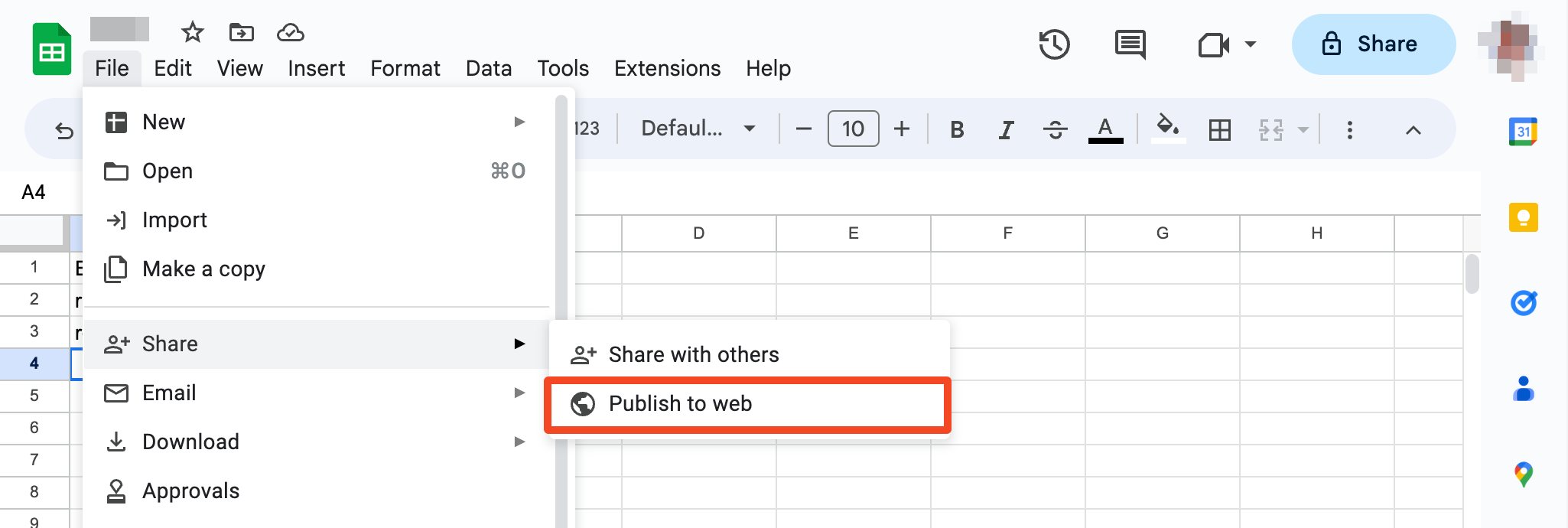
First publish your sheet by going to Share > Publish to web:
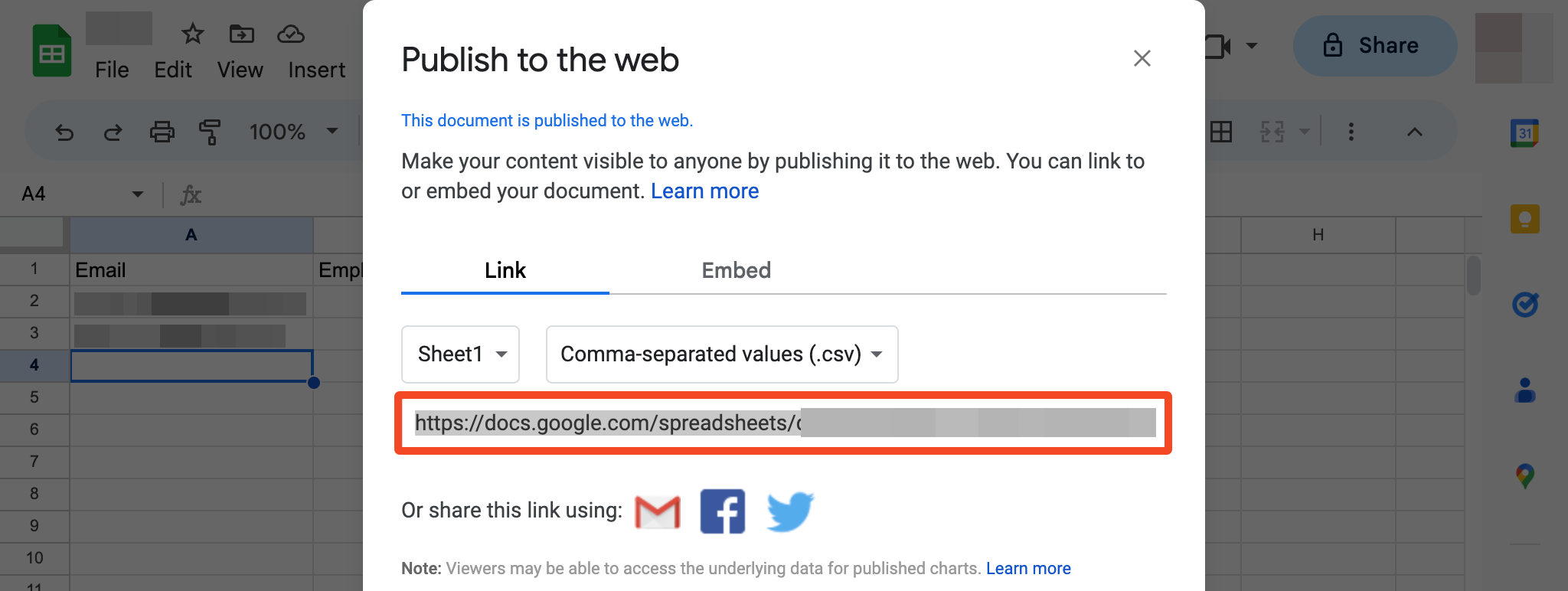
Choose Comma-separated values (.csv) as the format, select the sheet to publish and optionally check Automatically republish when changes are made:

Do not check Restrict access to the following.
You will then be shown the published URL which you will need to cut and paste into SaaS Manager:
Column name mappings
SaaS Manager will synchronize the following column names:
| Column Name | Synonyms |
|---|---|
| External Id | Id |
| Model Name | Model |
| Hardware Vendor | Vendor, Manufacturer |
| Serial Number | Serial, Serial # |
| Device Name | Device, Name, Friendly Name |
| Device Tag | Tag |
| Assigned to Email | Assigned To, Owner, Owned By |
| Location | Assigned Location |
| Notes | Memo, Info |
| Purchased Dtm | Purchase Date, Date Purchased, Purchased Date, Acquired, Purchased |
| Disposal Dtm | Disposed, Disposal |
| Net Price | Price, Paid, Cost |
| Net Price Currency | Currency |
| Warranty Expiration date | Warranty Expiration, Warranty Expires |
| Lifespan Expiration date | EOL, End Of Life |
| Platform | Type, OS, Operating System |
| Status | Current Status |
| Device Type | Type |
| Enrolled date | Enrolled, First Seen, First Enrolled |
| Last Sync date | Last Sync, Last Seen |
| OS Version | Version, Operating System Version |
| Is Encrypted? | Encrypted |
Device statuses
| Status | Synonyms |
|---|---|
| New | New |
| Ready To Deploy | Ready To Deploy, Ready, Pending |
| Deployed | Deployed, Active, In Use |
| Out For Repair | Out For Repair, Repair, Defective, Damaged |
| Retired | Retired, Dead, Lost |
Device platforms
| Platform | Synonyms |
|---|---|
| iOS | iPhone |
| Mac | OSX, macOS |
| Windows | Microsoft, Win32, Win64 |
| Android | |
| Linux | CentOS, Debian, Ubuntu, Fedora, Red Hat, OpenSUSE, Mint, Linux Mint, RHE, Kali, Zorin, Zorin OS, Knoppix |
| ChromeOS | Chrome, Chromebook |
Device types
| Device type | Synonyms |
|---|---|
| Laptop | |
| Desktop Computer | Desktop |
| Furniture | |
| Keyboard | |
| Mobile Phone | Cell Phone, Cell, Smartphone |
| Monitor | Display, Screen |
| Mouse | Trackpad |
| Network Equipment | Network, Router, Firewall |
| Peripherals | Devices |
| Printer | Laser Printer, Laser |
| Projector | Beamer |
| Server | |
| Tablet | iPad |
| Telephone & VoIP | VoIP, Speakerphone |
| TV | Flat Screen |
| Virtual Machine | VM |
| Other | Misc |
SaaS Manager accepts different capitalization or spacing.
Data requirements
Synchronized Sheets must contain either a Serial Number or External ID, and they must include a Model Name.
If a provided Model Name is matched in the global device library SaaS Manager will assign the Device Type from our library and the value provided for this field in your Sheet will be ignored.
If a provided Model Name is not matched in the global device library the integration will use any valid Device Type value provided. If the provided value is not valid SaaS Manager defaults to Device Type "Other".
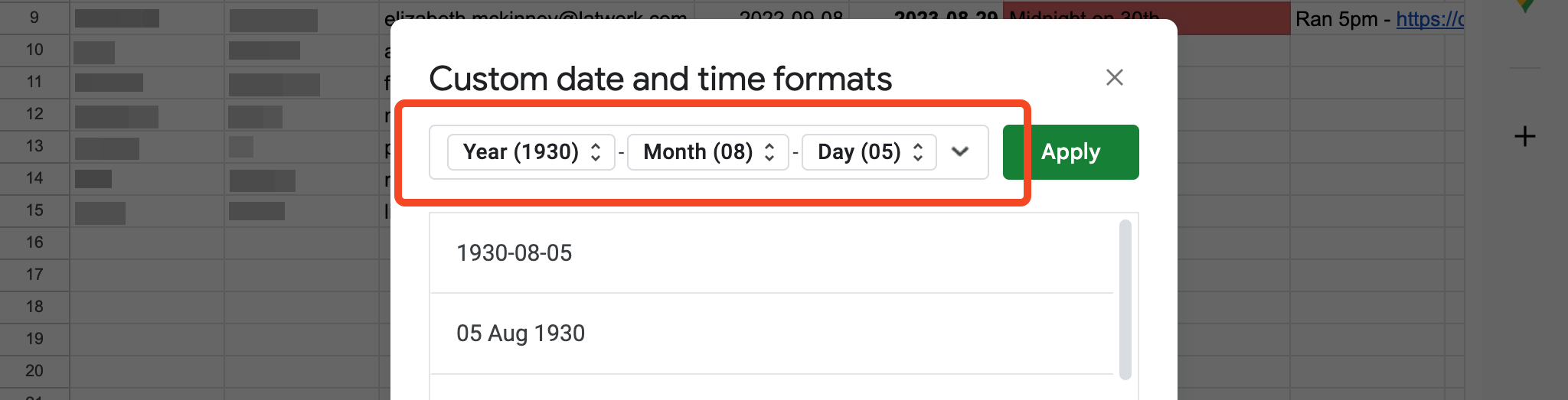
Please ensure that dates are formatted as yyyy-mm-dd or dd mmm yyyy, e.g. 2023-02-19 or 19 Feb 2023.
Go to Format > Number > Custom date and time:
Comments
0 comments
Please sign in to leave a comment.